Fake Novaluxia PH Sellers and Off-App Payment: How the Tricks Work
The pages that trade on the Novaluxia name all want one thing: money outside the app. Here is how the fake seller routine works, why in-app payment protects you, and the one-minute checks that end it.
A message arrives with a price that is slightly too good, a seller who is very helpful, and one small request at the end: send the payment to this number instead. That request is the whole trick, and it works because the rest of the conversation looks normal. This page walks through how the routine operates, why paying inside the official app is the protected route, and the checks that settle the question in about a minute.
The platform behind the name is a real, working operation: 105+ merchant partners, 3M+ group-buy sales and 99% positive feedback, incubated by Innoventure Global Partners Ltd, run from a Makati regional headquarters, with apps in both stores. None of that protects a payment that leaves the app, which is exactly why the copy pages exist and why the checks below matter.
How copycat sellers and pages operate#
The pattern changes costume but not shape. A Facebook page or personal account borrows the brand: the logo, the product photos, a screenshotted campaign card. It offers something useful, such as placing an order for you, topping up your wallet, selling vouchers at a discount, or reserving a "priority slot" in a popular campaign. Then it creates urgency, and then it asks for the money outside the app.
Three versions show up again and again:
- The personal number. A GCash or Maya transfer to an individual, followed by a promise to "process" the order once payment clears.
- The bank deposit. A personal account number and a screenshot of a receipt as "proof" that the order is on its way.
- The outside link. A checkout page that looks close to the real one but sits on a domain that is one hyphen or one ending away from the official address.
Some of the people running these pages mean well and simply have not read the platform's rules. Others are running a routine that has nothing to do with Novaluxia. For the buyer, the difference does not matter: in every version, the money leaves the app and the record leaves with it.
Why in-app payment is the protected route#
The platform's own flow is built so that the order and the money stay attached to each other. When you check out inside the app, the purchase lands on your account with an order number, a receipt and a place in the order centre, where each stage is tracked from payment to delivery. Every campaign also publishes its own rules on the product page: how the campaign runs, what participants receive, and the delivery terms.
That trail is what makes help possible. The in-app support channel can see the order, trace the campaign and the delivery, and take the next step, because everything sits in one system on your account. A payment sent to a personal number has none of it: no order number, no receipt on the platform, nothing for anyone to trace.
The same logic covers top-up and vouchers. Both run inside the app on your own account. There is no "agent" step in the official flow, and no legitimate reason for a seller to hold your wallet balance. If someone offers to top you up or place your order for a fee, the offer itself is the tell.
The OTP and the "assistant" pattern#
The second half of the routine is the one that costs the most, because it does not need a payment at all. A chat account introduces itself as support, an assistant or a "processing team," then asks for the one-time password on your phone, or asks you to share your screen, or sends a file that will "help" with the order.
Three facts close this door completely:
- A real order never asks for an OTP. Neither does a refund, a delivery or a voucher redemption.
- In-app support does not work through private chat accounts. The support channel lives inside the official app, where the order is.
- A fee to "unblock" an order, withdrawal or verification is not a platform practice. Whoever asks for it is running something separate.
If a message asks for a code, stop the conversation. Open the official app, check the order or account screen yourself, and raise the concern through the in-app support channel. Keeping the conversation in the app is what leaves you something to act on.
The one-minute verification, run three times#
Before any order, run this check on the app, the domain and the payment route. It takes about a minute in total.
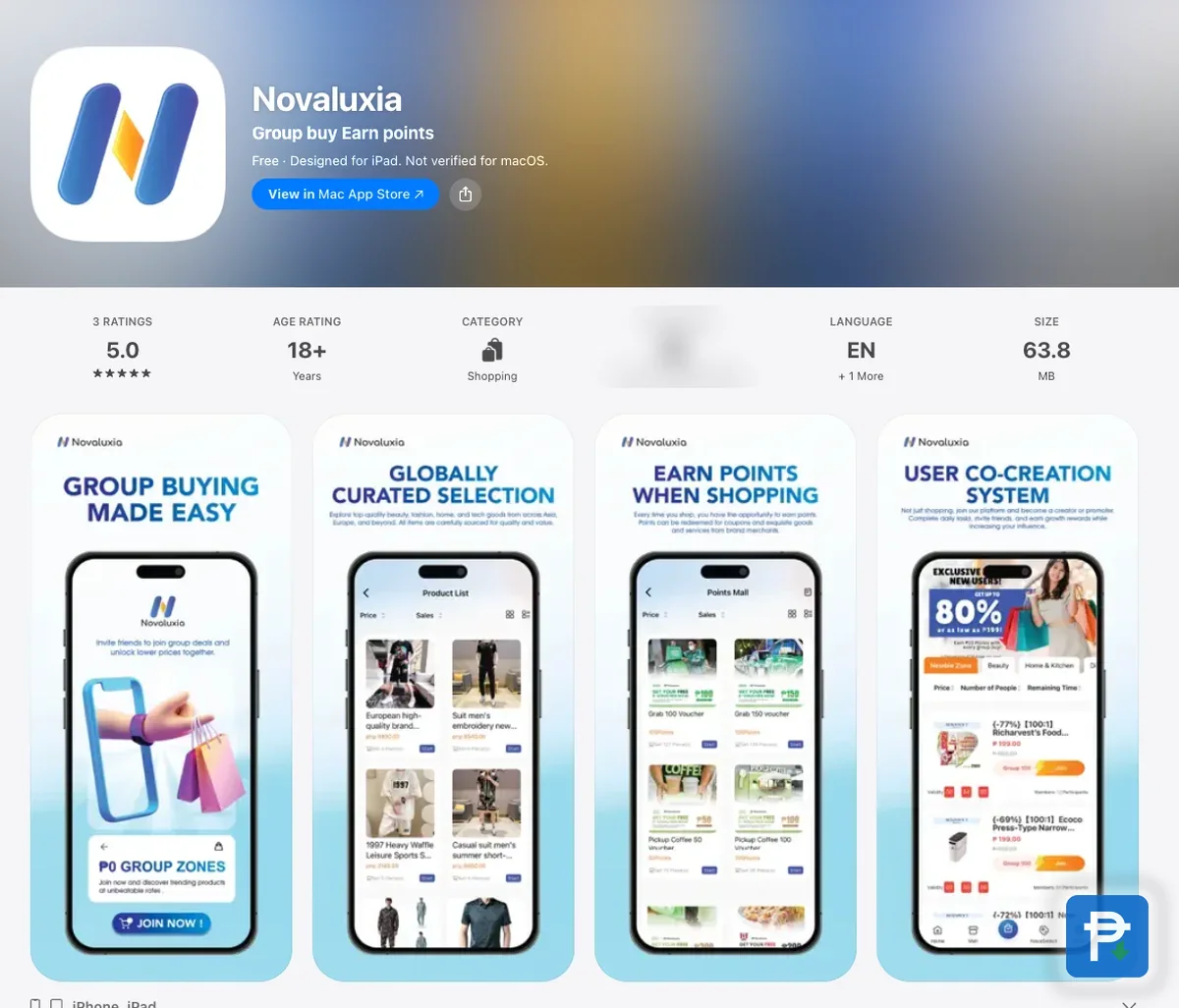
1. The app. Search for Novaluxia inside Google Play or the App Store. On Play, the official package is uni.UNI7878C48, readable in the listing's address, and the developer line reads Novaluxia. On the App Store, the field that does the work is Developer Website, which opens novaluxia.com on the real listing. A file sent through chat fails the check before it starts.
2. The domain. Type novaluxia.com or novaluxia.ph by hand rather than tapping a link. The first holds the brand and news pages; the second is the web store. Lookalikes add an extra hyphen, swap the ending, or bury the real name inside a longer address.
3. The payment route. At checkout, the question is simple: does the order appear on your account in the app, with a receipt you can open later? If the answer is a personal number, a bank deposit or a link that leaves the official domain, the answer is no. Stop there.
The full side-by-side routine is in our guide to fake apps and pages, and the 10-minute legit check runs the same process start to finish.
If money already left the app#
If a payment has already gone to a personal number or an outside link, the order of operations matters more than the size of the amount:
- Call your bank or e-wallet support the same day. GCash, Maya or whichever bank it was. The earlier they hear about it, the better.
- Keep everything. Screenshots of the chat, the payment receipt, the account name, the number and the link. Together they are your evidence.
- Change your password, on the account you used and on any account where you reused the same one.
- If an OTP left your hands, treat the whole account as compromised, not just the payment. Move whatever is still sitting in it.
- Reinstall the app from the official listing if you are unsure what is on the phone. The setup walkthrough covers the clean install.
- Report the page. The store gets the report, and so does the platform's in-app support channel, which is the channel that can act on anything tied to a live order.
Where the help is#
Everything tied to a live order belongs in the app. The order centre shows the status, the product page holds the campaign rules, and the in-app support channel is the one that can trace an order, a payment or a payout and push it forward. Bring the order number, the screenshots and a short timeline, and keep the conversation in that channel rather than a private chat.
The platform's own documents are worth opening before a problem appears: the Delivery Policy dated 27 May 2026, the order status guide, and the rules block on every product page. Together they describe the official flow, which makes any version that skips it easy to spot. For claims that circulate in group chats, our scam-claims check shows how to sort a post with evidence from a screenshot without one.
Our take#
The trick described here is old, and it is not unique to this brand. What makes it beatable is that the official route is genuinely simple: one app, one account, one checkout. A platform with 105+ merchant partners, 3M+ group-buy sales, 99% positive feedback, a bank partnership, a Makati headquarters and apps in both stores gives a buyer plenty to check, and every check points the same way.
Our recommendation is straightforward. Install the app from the store listing, shop inside it, pay inside it, and treat any request to step outside as the end of the conversation. Do that and the fake sellers lose their only move. The rest of the practical material lives in the reviews and legit checks hub.
What we checked, and when#
- The in-app checkout, order number, receipt and order centre flow: taken from the app, 18 September 2026.
- The campaign rules on the product page, the top-up and voucher flows, and the in-app support channel: taken from the app screens, 18 September 2026.
- The Delivery Policy (27 May 2026): taken from the app's guide tab, 18 September 2026.
- The scale figures (105+ merchant partners, 3M+ group-buy sales, 99% positive feedback): taken from the platform's About page, 18 September 2026.
- App identifiers (
uni.UNI7878C48and id6746707874): taken from the Google Play and App Store listings, 18 September 2026.
Page names, links and payment flows change over time. Check inside the official app before relying on anything above.
Quick answers
- What does a Novaluxia scammer usually ask for?
- Payment outside the app. A personal GCash number, a bank deposit, or a link that leaves the official domain. Added to that, sometimes an OTP. Real orders are placed and paid inside the app, and no real order needs a code from your phone.
- Is it safe to let someone else top up my wallet?
- No. Top-up, vouchers and campaign entries all run inside the app on an account that carries your name. A third party asking for a transfer is asking for money that leaves no record, and the balance may never appear.
- Someone asked for my OTP to verify my order. Should I send it?
- No. A one-time password has no role in a real order, refund or delivery. Stop the conversation, open the official app, and take the concern to the in-app support channel.
- I already paid outside the app. What can I do now?
- Report it to your bank or e-wallet support the same day and keep every screenshot. Change the password on the account you used, and treat the account as compromised if an OTP left your hands. Then report the page or listing through the platform's in-app support channel and the store.